解决Cloudflare CDN对我的网站的访问限制问题

我的这个博客网站使用Cloudflare CDN。

今天上午,Cloudflare给我发了一封电子邮件:
您好, 经我们确定,您有一个或多个 Web 资产似乎在未使用相应付费服务的情况下提供视频或数量不相称的大型文件,如 R2、Stream 或 Cloudflare Images。 针对这一情况,我们暂时停止了对部分出现问题的流量的服务。在此问题解决之前,您的有些访问者可能会感觉到性能上的变化。如果我们认为此问题仍未解决,我们可能会采取进一步措施,包括继续更改性能或在网络中停用有问题的区域。 受影响的资产有: - zuotijia.me
意思是,Cloudflare检测到我的这个博客网站在“免费计划”下提供了大量视频或大文件下载,这违反了 Cloudflare 的使用规则,因此他们已经开始限制部分流量。

Cloudflare认为,我在利用免费 CDN 当做文件分发网络 / 下载站,这是 Cloudflare 免费计划不允许的。然后他们限制我这个网站的某些文件的 CDN 加速,导致我这个网站访问起来很卡。

使用curl命令获取我这个网站的响应头信息:

$ curl -I https://www.zuotijia.me
HTTP/2 302 
date: Sat, 07 Mar 2026 06:44:20 GMT
location: https://www.cloudflare-terms-of-service-abuse.com/stream.ts
access-control-allow-origin: *
cache-control: private, max-age=0, no-store, no-cache, must-revalidate, post-check=0, pre-check=0
expires: Thu, 01 Jan 1970 00:00:01 GMT
server: cloudflare
cf-ray: 9d87a18c0e060be4-AMS

可以看到:

HTTP/2 302
location: https://www.cloudflare-terms-of-service-abuse.com/stream.ts
server: cloudflare

这表示 Cloudflare 已经对我的域名启用了 “Terms of Service Abuse” 拦截。所有访问都会被 302 重定向到他们的滥用提示页面。

Cloudflare 的风控系统已经把我的站点标记为 CDN滥用状态,现在处于 强制限制模式。

那么如何解除这个强制限制模式?

首先要确定是哪些网站文件触发了这个Cloudflare的风控。前天我用一张120kb大小的图片设置为网站头像,应该是它引起的。然后我看了一下Cloudflare管理面板->分析和日志->Web Analytics页面,发现网站的首屏图片
#wp-custom-header>img

www.zuotijia.me/wp-content/themes/twentyseventeen/assets/images/header.jpg
它的LCP达到10,660 毫秒!那么它就是引起这一问题的罪魁祸首。

以前一直使用这个默认主题,为啥今天就触发Cloudflare的风控了呢?因为我这个网站的流量大起来了。

既然确定了引发问题的原因,那么解决步骤如下。

进入WordPress的管理后台->外观->自定义,在主题编辑页面,点击页眉媒体->隐藏页眉图片,再点击“发布”按钮保存更改。很多现代站点都不再用这种巨图。

再进入WordPress的管理后台->设置->常规页面,移除站点图标,然后点击最下方的“保存更改”按钮保存更改。

在Cloudflare的DNS配置页面中把网站的域名的CDN配置从Proxied(橙云)改为DNS only(灰云),绕过 Cloudflare 拦截,临时恢复网站的正常访问。

给Cloudflare回复以下邮件:

Hello,

We have identified the issue that triggered the abuse detection.

The large image resource causing excessive CDN traffic has been optimized and caching rules have been configured. The website is no longer serving large files through Cloudflare CDN.

Could you please review the restriction on the domain zuotijia.me and remove the abuse limitation?

Thank you.

意思是我已经移除了触发CDN限制的网站图片,请解除对我的域名的限制。

一般等个6到24小时,Cloudflare就能解除对我的域名的限制。

过段时间我给网站换个美观一点的主题。
使用Cloudflare CDN免费功能优化网站访问速度

如果我们的网站使用Cloudflare CDN,那么Cloudflare免费提供了几个优化网站访问速度的功能,可以利用起来。

优化一、开启Smart Shield

在Cloudflare管理面板的“速度”->”Smart Shield”页面,启用Smart Shield功能,保护源服务器、提高内容可用性并缩短网络延迟时间。

优化二、免费加速网站的访问

在Cloudflare管理面板的“速度”->“设置”页面,应用 Cloudflare 的标准建议设置,优化我们的站点。

优化三、创建缓存规则Cache Rules

对于免费版的Cloudflare,我们总共可以创建10个Cache Rules。

缓存规则1:缓存所有内容(Cache Everything)

创建一条缓存规则,把“绕过缓存”改成 “缓存所有内容(Cache Everything)”。

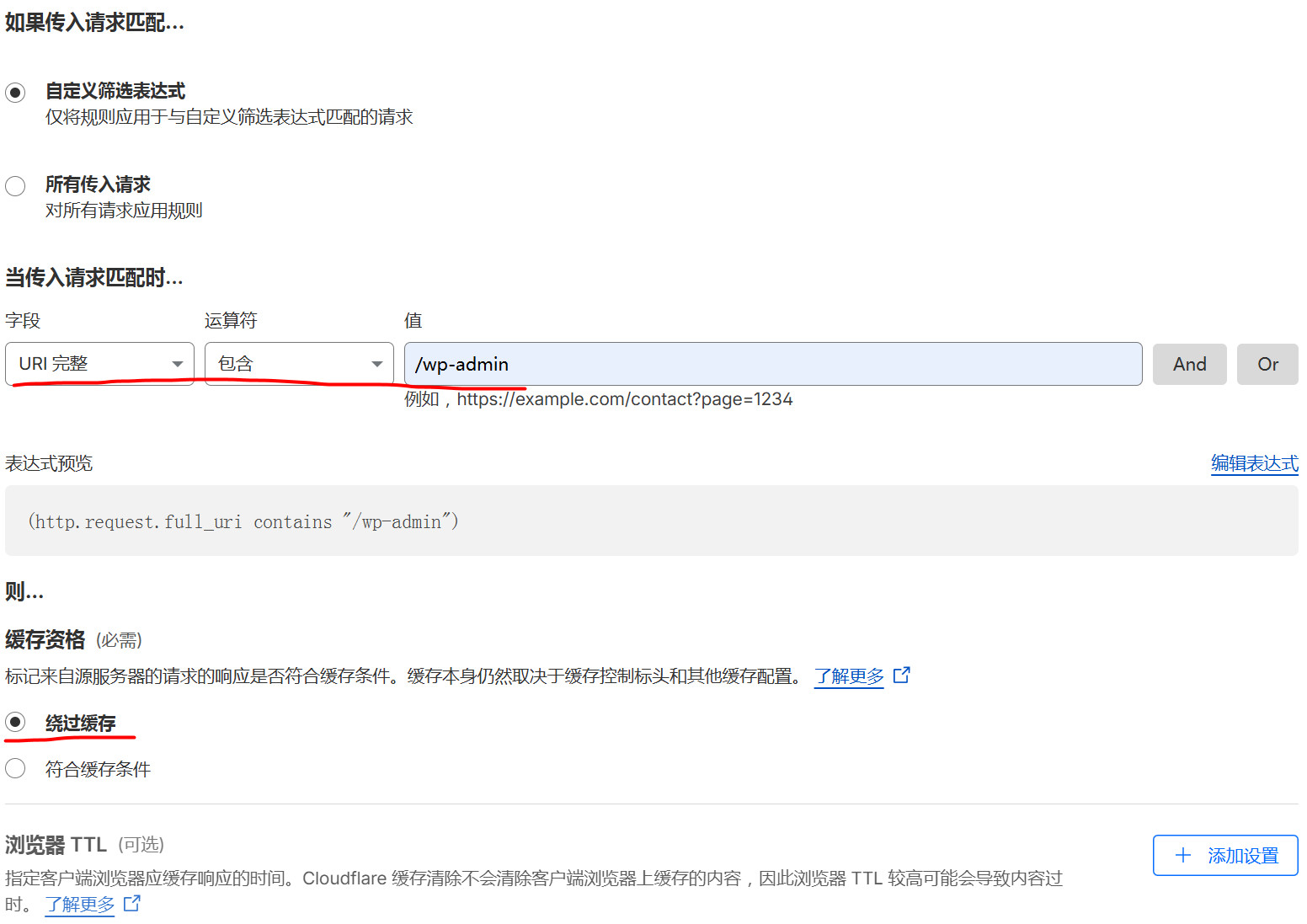
缓存规则2:对于WordPress网站,新增一条规则不缓存/wp-admin

具体做法如下图所示:

缓存规则3:对于WordPress网站,再新增一条规则不缓存/wp-login

做法同上。

如果缓存/wp-admin/wp-login,WordPress网站后台功能可能会有问题,例如不能实时看到对媒体文件的更改。

WordPress网页顶部出现警告信息“使用参数调用函数WP_Dependencies->add_data()已弃用”的解决方法

我升级WordPress的版本到6.9后,访问网站的文章,发现网页顶部有如下警告信息:

PHP Deprecated:  自 6.9.0 版本起,使用参数调用函数 WP_Dependencies-&gt;add_data() <strong>已弃用</strong>!所有支持的浏览器都会忽略 IE 条件注释。 in /var/www/blog/wp-includes/functions.php on line 6131

解决这个警告的方法是,升级当前使用的WordPress主题到最新版。

我升级当前使用的WordPress主题到最新版后,整个网站的访问速度似乎也提升了不少。

WordPress Site Clone: The One Thing That Will Save You From Infinite Redirect Hell

You just copied a full WordPress site — files + MySQL dump — fired it up on a shiny new domain, and… nothing works.

  • Browser spins forever (infinite redirect loop)
  • CSS/JS/images all 404
  • wp-admin is a white screen of death

Classic symptom: the database is still shouting the old domain everywhere.

Here’s exactly what you need to do, in order of preference (fastest → most manual).

Method 1: WP-CLI (the nuclear option, do this first)

cd /var/www/your-new-site

# Hit both http and https variants because WP loves to store both
wp search-replace 'https://old-domain.com' 'https://new-domain.com' --all-tables --precise
wp search-replace 'http://old-domain.com'  'https://new-domain.com' --all-tables --precise

# Clean everything up
wp cache flush
wp rewrite flush --hard

Done in 10 seconds. Most reliable.

Method 2: Straight SQL (when WP-CLI isn’t available)

UPDATE wp_options 
SET option_value = 'https://new-domain.com'
WHERE option_name IN ('home', 'siteurl');

After running that:

  • Hard-refresh your browser (Ctrl+Shift+R)
  • Restart Nginx/Apache
  • If you use Redis/Object Cache → flush it

Method 3: wp-config.php override (quick & dirty, works even if DB is broken)

Drop these two lines at the very top of wp-config.php (right after <?php):

define('WP_HOME',    'https://new-domain.com');
define('WP_SITEURL', 'https://new-domain.com');

WordPress will automatically update the database on first load. Super handy for emergency rescues.

Pro tips from someone who’s cloned way too many sites:

  • Always use https in the new domain unless you have a very good reason not to.
  • Search-replace both http and https versions — WP stores them separately.
  • If you’re on a staging → production move, also run the search-replace on any serialized data (WP-CLI’s –precise flag handles most of it).
  • After everything works, remove the two define() lines from wp-config.php so future changes go through the normal Settings → General screen.

Do this once and your cloned site will behave like a real, healthy WordPress install instead of a haunted redirect zombie.

WordPress克隆站点必须要做的事情

克隆站点是指从一个现有的WordPress网站复制源代码和MySQL数据库中的数据,然后搭建成另外一个网站,使用不同的域名。

克隆站点因为是从另一个站点完整复制的,数据库里还存着旧域名,使用浏览器访问它大概率会出现以下问题:

  • 无限重定向
  • 资源加载 404
  • 后台打不开

因此需要把旧域名替换为新域名,有以下几种方式。

方式1,使用WP-CLI

cd /var/www/clone-site # 进入克隆站点的web根目录
wp search-replace 'https://旧域名.com' 'http://新域名.com' --all-tables --precise
wp search-replace 'http://旧域名.com' 'http://新域名.com' --all-tables --precise
wp cache flush
wp rewrite flush --hard

方式2,使用SQL更新数据库

UPDATE wp_options SET option_value = 'http://新域名.com' 
WHERE option_name IN ('home', 'siteurl');

替换完后,清浏览器缓存 + 重启 Nginx + 清 WP 对象缓存(如果用了 Redis/Object Cache)。

方式3,在wp-config中更改配置

把以下两行代码放在 wp-config.php 文件里的顶部:

define('WP_HOME', 'http://新域名.com');
define('WP_SITEURL', 'http://新域名.com');

这会更新数据库。

升级PHP版本导致WordPress无法显示文章,而是显示“有点尴尬诶!该页无法显示。”的解决方法

我的WordPress版本是5.4.15,当我把服务器系统里的PHP 7.2升级到PHP 8.2后,通过浏览器访问WordPress网站,无法显示文章,而是显示“有点尴尬诶!该页无法显示。”这句话。

经测试,PHP可以正常连接到MySQL数据库。

原因应该是WordPress 5.4.15用到的某些PHP函数在PHP 8.2过时了。

升级WordPress到最新版本解决了这个问题。