The IP you get when you ping gitlab.yourcompany.com (or whatever your instance is) is almost never the actual IP that your Git remotes are talking to over SSH.
Quick way to find the real SSH host IP + port:
- Create a throwaway test repo on your GitLab instance
- Go to the repo’s “Code” button → “Clone with SSH”
- Copy the git@xxx line — the hostname right after the @ is your real SSH server IP (or hostname), and the port is usually right there too (often 22, but self-hosted instances love 2222, 8022, etc.)
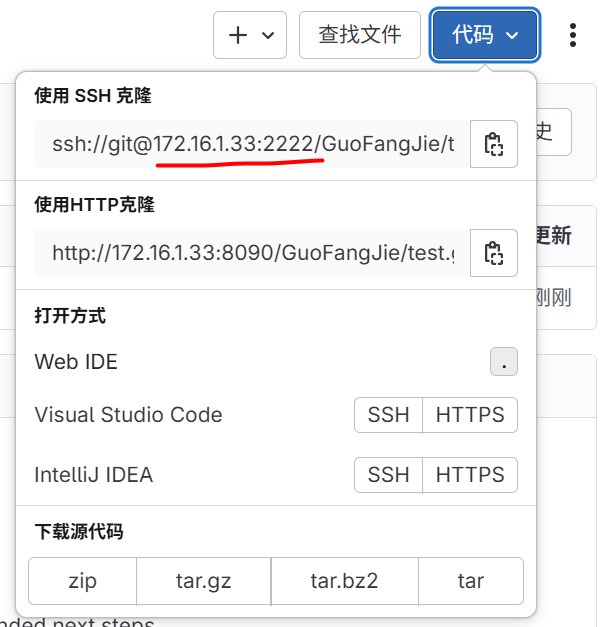
Common mistake that bites almost everyone:
You do this in ~/.ssh/config:
Host gitlab.jhso.cn
    HostName 172.16.1.33
    User git
    Port 2222
    IdentityFile ~/.ssh/id_ed25519_jhso
Then git clone git@gitlab.jhso.cn:group/project.git fails with
fatal: unable to access ‘git@gitlab.jhso.cn:group/project.git/’: …
Why? Because ssh is connecting to whatever A/AAAA record gitlab.jhso.cn currently resolves to — which is usually the web frontend/load-balancer IP, not the actual gitaly/ssh server.
Correct way (the ugly but working way):
Host 172.16.1.33
    HostName 172.16.1.33
    User git
    Port 2222
    IdentityFile ~/.ssh/id_ed25519_jhso
And now your remotes become git@172.16.1.33:group/project.git (yes, IP as hostname in the URL — it feels dirty but it reliably bypasses the wrong DNS target).
Moral: When GitLab is self-hosted/behind weird proxies/CDNs/firewalls, trust the SSH clone URL it literally shows you, not the pretty domain you use in the browser.